

Did you know you can hide your files and folders without any software in Windows ?
Yes, it is possible to hide files and folders by simple commands using command prompt.
Follow these simple steps to hide the folder and files:
*. Open Run command dialog box by pressing Win+R and type cmd to open command prompt window.

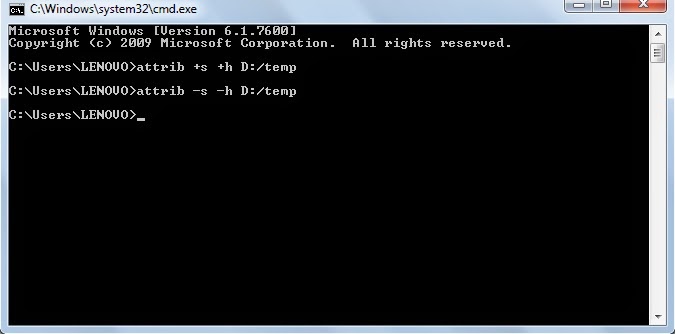
*. Now type attrib +s +h D:/temp and press Enter. Here D: denotes the drive on which folder is located and temp is the folder that you want to hide.

Yes, it is possible to hide files and folders by simple commands using command prompt.
Follow these simple steps to hide the folder and files:
*. Open Run command dialog box by pressing Win+R and type cmd to open command prompt window.
*. Now type attrib +s +h D:/temp and press Enter. Here D: denotes the drive on which folder is located and temp is the folder that you want to hide.
*. Now look into the drive for the folder your folder will be hidden.
*. To show the folder again type in command prompt attrib -s -h D:/temp. You can see that your folder is now visible.
This is a very easy windows trick you may use for your convenience.


D48CA6A5
ReplyDeleteBirecik
Girne
Gazipaşa
İslahiye
Osmangazi
Hopa
Güzelbahçe
Şirinyer
Gelibolu
29AE7EA7
ReplyDeleteNarlıdere
Eşme
Bodrum
Salihli
Sur
Alanya
İzmit
Ölüdeniz
Gelibolu